
REVIEW · JAPAN RAIL PASSES AND AIRPORT TRANSFERS
Japan: eSIM with Unlimited Local 4G/5G Data
Your data should work the minute you land.
With this Honshu Japan eSIM from LINK KOREA, you scan a QR code and connect to KDDI(au) quickly, then enjoy unlimited local 5G/4G data without hunting for a physical SIM. The biggest catch is that 5G can switch to 4G indoors, underground, or in crowded spots, so plan on it being mostly fast, not always maximum speed everywhere.
I also like the fact you choose between two practical speed setups. Go Ultra for unthrottled local data, or Lite when you want the Lite plan max speed at 10Mbps and typically a smaller daily hotspot allowance depending on your trip length. One more thing to know upfront: the QR code in the GetYourGuide voucher is not the eSIM QR code, and the correct one is sent by email about a day before your activity date.
In This Review
- Key Points Worth Filing Away Before You Install
- What This Honshu Japan eSIM Actually Gives You
- Ultra vs Lite: Which One Fits Your Japan Phone Habits
- Ultra plan (3 to 30 days)
- Lite plan (3 to 10 days)
- How long the plan really lasts
- The QR Code Confusion That Trips People Up
- If you see QR code invalid, do this
- Before You Buy: Your Phone Has to Be eSIM Ready
- Installing the eSIM: What the Timeline Looks Like
- Connecting in Japan: Expect Fast Data, Not Always Maximum 5G
- Using It for Real Travel: Maps, Transit, and Message Apps
- Subways and underground rides
- Hotspot Sharing: Useful, but Read the Limits
- Data Speed Expectations: How to Decide Ultra vs Lite in One Minute
- Customer Feedback Themes That Matter
- Practical Tips So You Do Not Waste Time at the Start
- Provider and Coverage Context: Why LINK KOREA Matters Here
- Should You Book This Honshu Japan eSIM?
Key Points Worth Filing Away Before You Install
- Real KDDI(au) local network access (the eSIM uses Japan coverage, so your apps act like you are in-country)
- Unlimited local 5G/4G data options via Ultra or Lite, with Lite capped at 10Mbps
- QR code delivery timing matters: voucher QR is not the install code, the eSIM QR arrives separately by email
- Activation happens after you arrive in Japan, not the moment you buy
- Hotspot is supported with limits, and the included hotspot data depends on how many days you choose
Sorting the logistics. Passes and transfers we used
- Mt Fuji and Hakone 1-Day Bus Tour Return by Bullet Train
★ 5.0 · 26,383 reviews - Mt Fuji & Hakone Cruise, Drum Show Bullet Train 1 Day from Tokyo
★ 4.0 · 7,413 reviews - Tokyo Mt Fuji 5th St & Hakone Cruise Bus Tour w/Bullet Train
★ 4.4 · 5,024 reviews - From Tokyo: Mt. Fuji & Hakone Tour w/ Return by Bullet Train
★ 4.2 · 1,278 reviews
What This Honshu Japan eSIM Actually Gives You
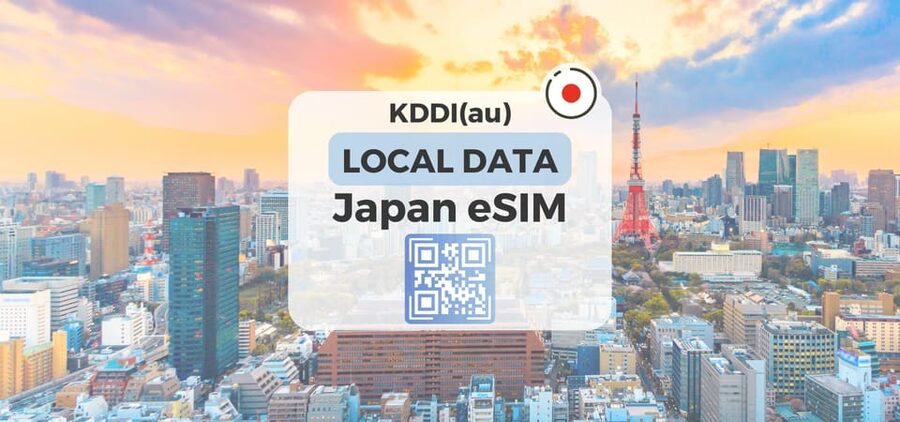
This is a local-data eSIM for Honshu, Japan, running on the KDDI(au) 5G and 4G network. Instead of swapping SIM cards in a shop, you get an eSIM QR code by email and install it on your phone. Once you are in Japan, you connect and start using data right away.
The big win is that you stay online for maps, ride-hailing, messaging apps, and translations without thinking about roaming charges. You also do not deal with a fragile plastic SIM that you might forget, lose, or break in the airport chaos.
Price is listed as $10 per person. That is the kind of price that can be worth it even if you only use your phone for essentials, because Japan can be expensive for data if you rely on roaming. The main value question is not whether data is useful, it is whether your phone is ready for eSIM.
Ultra vs Lite: Which One Fits Your Japan Phone Habits
You get two plan types, both unlimited local data on Japan’s network, but with different speed rules and duration flexibility.
Ultra plan (3 to 30 days)
Ultra gives Unlimited 5G/4G local data with no throttling. In plain terms: if you are a heavy data user, or you just want the simplest promise, Ultra is the one to pick.
- Mt Fuji and Hakone 1-Day Bus Tour Return by Bullet Train★ 5.0 · 26,383 reviews
- 1-Day Tokyo Bus Tour★ 5.0 · 14,250 reviews
- Tokyo: teamLab Planets TOKYO Digital Art Museum Entry Ticket★ 4.6 · 9,779 reviews
- Mt Fuji & Hakone Cruise, Drum Show Bullet Train 1 Day from Tokyo★ 4.0 · 7,413 reviews
- Tokyo Mt Fuji 5th St & Hakone Cruise Bus Tour w/Bullet Train★ 4.4 · 5,024 reviews
Lite plan (3 to 10 days)
Lite gives Unlimited 5G/4G local data too, but with a max data speed of 10Mbps. That still supports most normal travel use well: maps, posting photos, streaming music, and most messaging tasks. If you plan to download big things, upload large videos, or work remotely under higher bandwidth needs, Ultra tends to be the safer bet.
How long the plan really lasts
Plan duration is given as 3 to 30 days depending on which option you choose. For Lite specifically, usage is calculated based on calendar days starting from when you first connect to the KDDI(au) network in Japan. The spec notes an example where connecting at 10 PM Japan time counts as one full day by midnight. That means your exact arrival time can slightly affect day count.
If you are the type who lands late and then immediately grabs dinner, you might lose some time compared to a morning arrival. Not a dealbreaker, just something to keep in mind so you do not feel surprised.
The QR Code Confusion That Trips People Up
This eSIM is QR-based, but the QR you see first is not the QR you need. Here is the clean rule.
- The QR code in the GetYourGuide voucher is not the eSIM QR code
- The eSIM QR code is delivered separately via email, about 1 day before the activity date
That split is worth respecting. If you try to use the voucher QR as your install code, you can get install errors like QR code invalid.
When things go wrong, do not guess. Go to your phone settings and check whether a new eSIM profile appeared.
If you see QR code invalid, do this
The troubleshooting steps provided are specific:
- On iOS, check Settings > Cellular (iOS)
- On Android, check Settings > Connections > SIM Manager (Android)
- Look for whether there is a new eSIM showing on that page
If you are still stuck, the guidance is to contact the supplier by email or WhatsApp.
Before You Buy: Your Phone Has to Be eSIM Ready
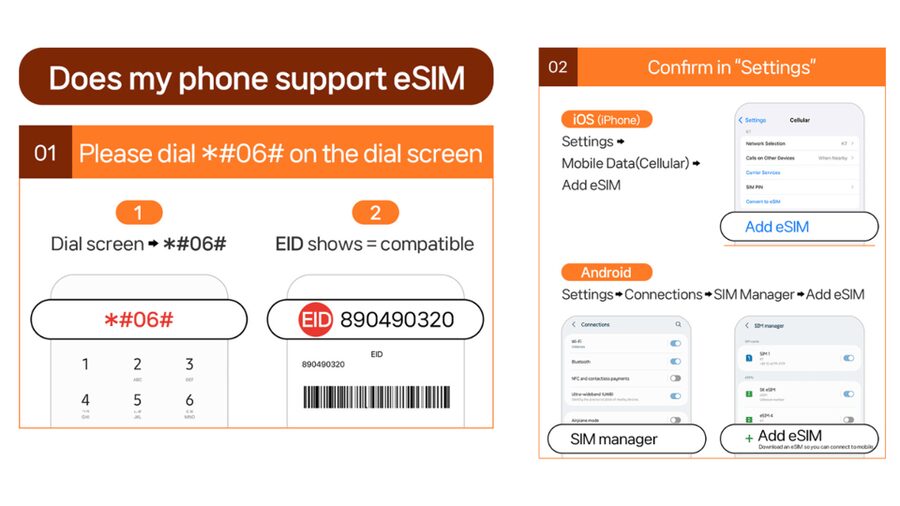
Before you pay, confirm your device can actually use eSIM. The data includes a simple test.
- Dial #06# and see whether EID shows
If EID is not showing, your device is likely incompatible with eSIM, and this purchase will not work. Also make sure your phone is unlocked for a foreign SIM / eSIM, since the eSIM plan needs to install on your hardware.
This is the most important practical gate. Everything else is fixable with support, but incompatible hardware can waste time.
Installing the eSIM: What the Timeline Looks Like
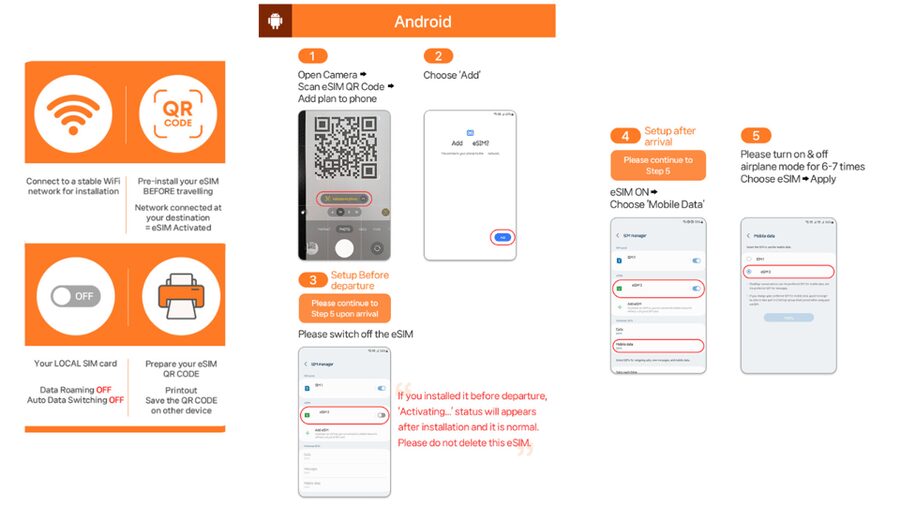
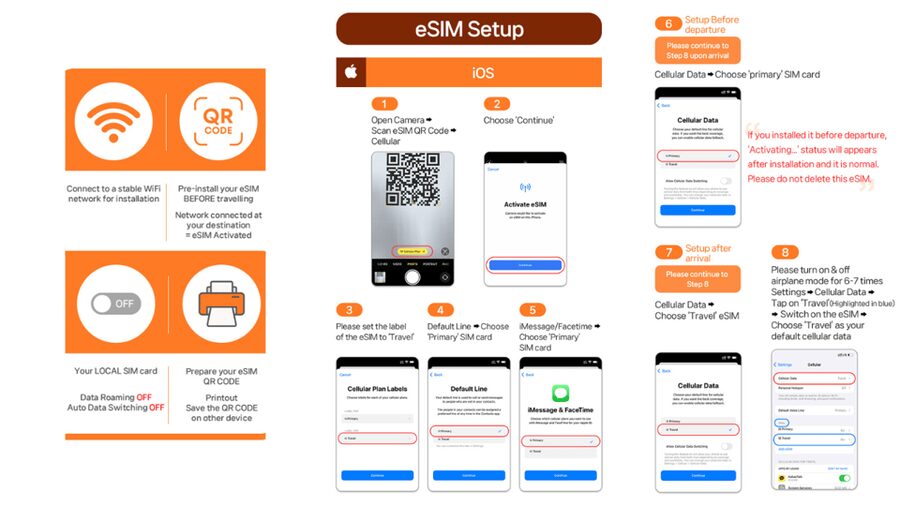
This plan has a timing quirk that matters: the eSIM connects to the local network after you have arrived in Japan. So do not plan on having fully working Japan data while you are still in the departure lounge.
A practical approach:
- When your eSIM QR code arrives by email, install it on your phone when it suits you.
- Wait to connect to the network until you are actually in Japan.
- Then test it quickly, before you rely on it for directions.
Also note the QR code window:
- The eSIM QR code must be installed and activated within 30 days of purchase
If your trip stretches or you change plans, do not assume the code will keep working forever.
Connecting in Japan: Expect Fast Data, Not Always Maximum 5G
The plan is designed for quick local connection on arrival, and the reviews back that up with one theme: it works well once you are there.
In the best-case scenario, you scan and connect, then you are online across the day. One review highlights signal availability even on the subway, which is exactly where Japan trips often go sideways for weak roaming coverage.
Still, the spec sets expectations:
- 5G may be affected by location like indoors, underground, or crowded areas
- In those moments, the connection may switch to 4G
So think of it like this: you should have reliable data access, but speed can vary by where you stand, not by whether the eSIM is broken.
Using It for Real Travel: Maps, Transit, and Message Apps
For most people, unlimited local data changes your behavior. You stop rationing searches. You stop trying to remember which Wi-Fi spot is closest. You can keep a translation app running while you walk into shops and temples.
Where this plan seems strongest, based on the info you have:
- You can keep using data across daily errands in Japan
- The eSIM is set up for local 5G/4G access, which typically supports modern app traffic smoothly
- Hotspot sharing is included, with limitations that match how the plan is priced and structured
One review mentions easy setup and signal available everywhere, including subway rides. That is the kind of reliability that turns data into a tool, not an optional luxury.
Subways and underground rides
Japan transit often means concrete walls and signal shadows. Even with excellent coverage, you can still see a 5G to 4G shift. The good news is the experience is not described as failing, it is described as working, just sometimes at reduced speed.
Hotspot Sharing: Useful, but Read the Limits
If you travel with a second phone, a tablet, or you share data with someone who did not bring an eSIM, hotspot is a key feature.
This plan supports hotspot sharing, but with limitations depending on the selected plan. The specs include an included hotspot data table that scales with trip length:
- 3 to 4-day: 3GB
- 5-day: 4GB
- 6-day: 5GB
- 7-day: 6GB
- 8-day: 7GB
- 9-day: 8GB
- 10-day: 9GB
- 15-day: 15GB
- 20-day: 19GB
- 30-day: 30GB
So if hotspot is part of your plan, treat the hotspot allowance like a separate mini budget. Data for your own phone is unlimited local data, but hotspot has an included cap.
Also, the hotspot support is described as having limitations, which means once you hit the included amount, you might find the experience slows or restricts further use. If you rely on hotspot for heavy video calls, plan to use it conservatively.
Data Speed Expectations: How to Decide Ultra vs Lite in One Minute
Here is a simple way to pick based on your travel style.
Choose Ultra if:
- You download a lot of media
- You work or upload while on the move
- You want maximum speed without thinking about caps
Choose Lite if:
- You mostly need maps, messaging, photos, and normal browsing
- You share hotspot only lightly
- You want the plan that fits shorter trips (Lite is listed as 3 to 10 days)
The Lite plan max speed of 10Mbps is not a dead stop, but it is a clear signal. If you are the type who gets impatient with buffering, Ultra is the smoother choice.
Customer Feedback Themes That Matter
With a rating of 4.5 from 163 reviews, the feedback points to two strong areas: setup ease and coverage reliability.
What gets praised most:
- Easy setup and installation
- Signal available even on the subway
- Ability to use it broadly around Japan
- Support for sharing with other phones via hotspot
One helpful sentiment is also practical: there is a wish for more duration options. That is not an operational issue for most people, but it is worth noticing if your trip is unusual length and you want it to match perfectly. This plan offers 3 to 30 days depending on which option you select, so for many journeys it will fit. If you fall outside your comfort window, you may need to be flexible on dates.
Practical Tips So You Do Not Waste Time at the Start
These are small moves that save real travel time.
- Install when your eSIM QR arrives, but plan to connect after you land
- Confirm your phone supports eSIM using #06# and EID
- If you see QR code invalid, check Settings > Cellular (iOS) or SIM Manager (Android) for the new eSIM profile
- Expect 5G to sometimes drop to 4G indoors or underground, so do not panic
- If you need hotspot for another device, treat the included GB cap as real
Provider and Coverage Context: Why LINK KOREA Matters Here
The provider listed is LINK KOREA. The practical takeaway is support matters with eSIMs, and the instructions include clear troubleshooting and the option to contact the supplier by email or WhatsApp if your eSIM will not install or connect.
Coverage is stated as Japan, and the plan is positioned for Honshu. On KDDI(au) local networks, that is often exactly what you want for dependable app use across city transport and everyday movement.
Should You Book This Honshu Japan eSIM?
Book this if you want the simplest path to unlimited local 4G and 5G data in Japan, with a QR-based install and a plan that fits a wide range of trip lengths. It is especially worth it if you hate SIM pickups and want your phone working as soon as you arrive.
Skip it or switch plans if:
- Your phone does not show EID for eSIM support
- You absolutely need voice calls and SMS included, since this plan lists Voice & SMS: N/A
- You rely heavily on hotspot for lots of data beyond the included limit, since hotspot is supported but capped depending on your duration
If your trip is within the 3 to 30 day window and you can use eSIM, this is a strong value way to keep your phone useful all day in Japan.
Passes, Transfers, Logistics





Newest Tokyo write-ups from the Loving Japan desk





Japan Rail Passes and Airport Transfers, side by side.
 ★ 5.0Mt Fuji and Hakone 1-Day Bus Tour Return by Bullet TrainFrom $16326,383 reviews
 ★ 4.0Mt Fuji & Hakone Cruise, Drum Show Bullet Train 1 Day from TokyoFrom $1497,413 reviews
 ★ 4.4Tokyo Mt Fuji 5th St & Hakone Cruise Bus Tour w/Bullet TrainFrom $1545,024 reviews
 ★ 4.2From Tokyo: Mt. Fuji & Hakone Tour w/ Return by Bullet TrainFrom $1171,278 reviews
 ★ 4.7Osaka/Kyoto: Hiroshima Miyajima Bus Tour & Shinkansen TicketFrom $277919 reviews
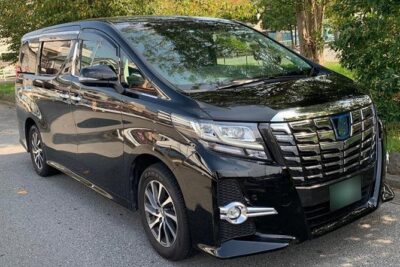 ★ 4.5Haneda Airport (HND) Private Transfer to Central TokyoFrom $104636 reviews
 ★ 4.0From Tokyo 1-Day Kyoto English-guided Tour by Bullet TrainFrom $452376 reviews
 ★ 4.0Mt. Fuji and Hakone Day Trip From Tokyo with Bullet Train OptionFrom $97368 reviews
Filed on these lists too